Backup & Sync
Linux File Copy & Sync
(lin-filecopy)
Copy and sync folders without the command line.
Local · offline-first
How to install: Run the one-line install command to set it up automatically, or download the package and install it; a user-only, no-admin option is also offered.
Overview
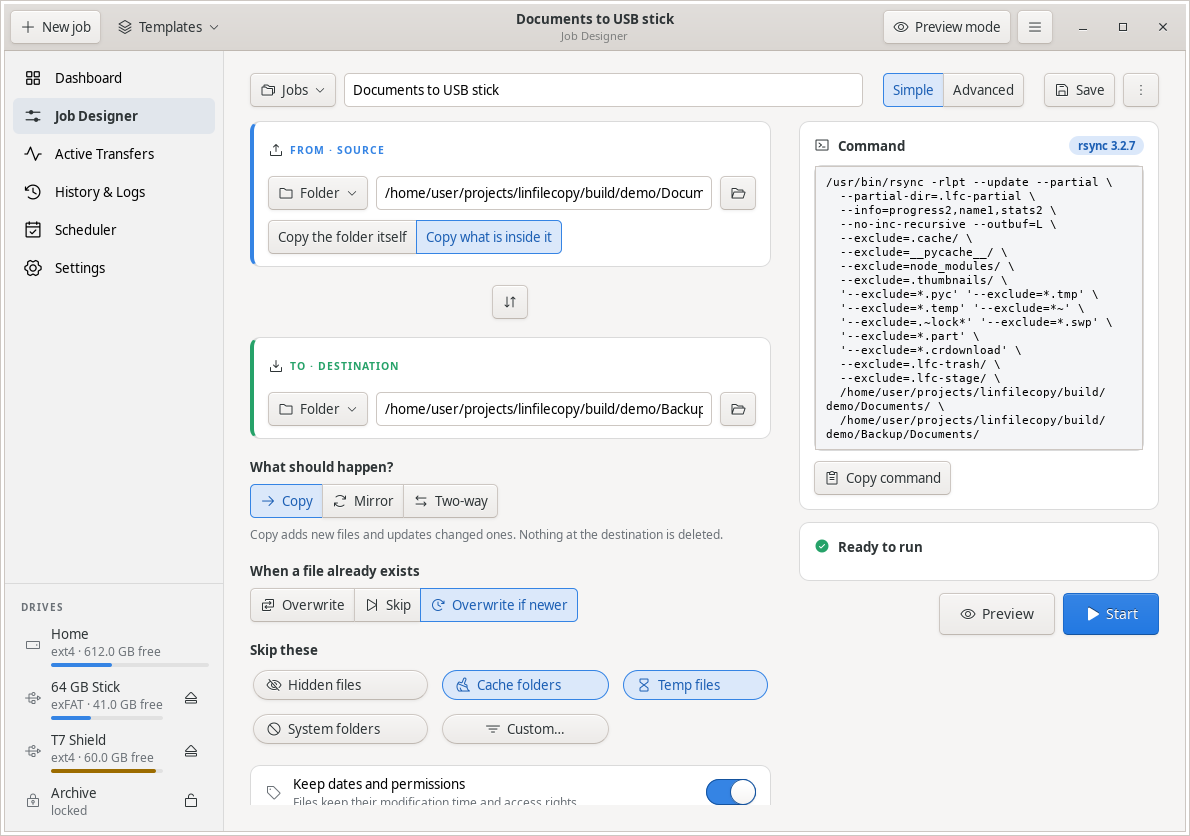
LinFileCopy makes copying, mirroring and syncing folders between disks, USB sticks and external drives simple and safe. You set up a job with a clear form, preview exactly what will change before anything happens, then run it and watch live progress. It handles the tricky details for you while always showing what it is about to do.
Platform: Linux desktop
Features
Copy, mirror or two-way sync between local and external drives
Preview every change before you run, so there are no surprises
Live progress with speed, time remaining and current file
Start, pause and cancel any job safely, with deletion confirmations
Skip clutter like hidden files, caches and temporary items
Full history of every run with stats, logs and one-click re-run
Resume interrupted copies and verify files for peace of mind
Schedule jobs or run them when a drive is connected
What you can do
1Build a copy or sync job by picking a source and destination.
2Preview exactly what will be added, updated or removed before running.
3Watch a job run live and pause or cancel it at any time.
4Re-run or schedule your saved jobs automatically.
Get Linux File Copy & Sync
Download comes straight from the project's source on GitHub — nothing is hosted here.
Download